tvxkmpro · Your shell, one key away.
Your shell and every command, one key away.
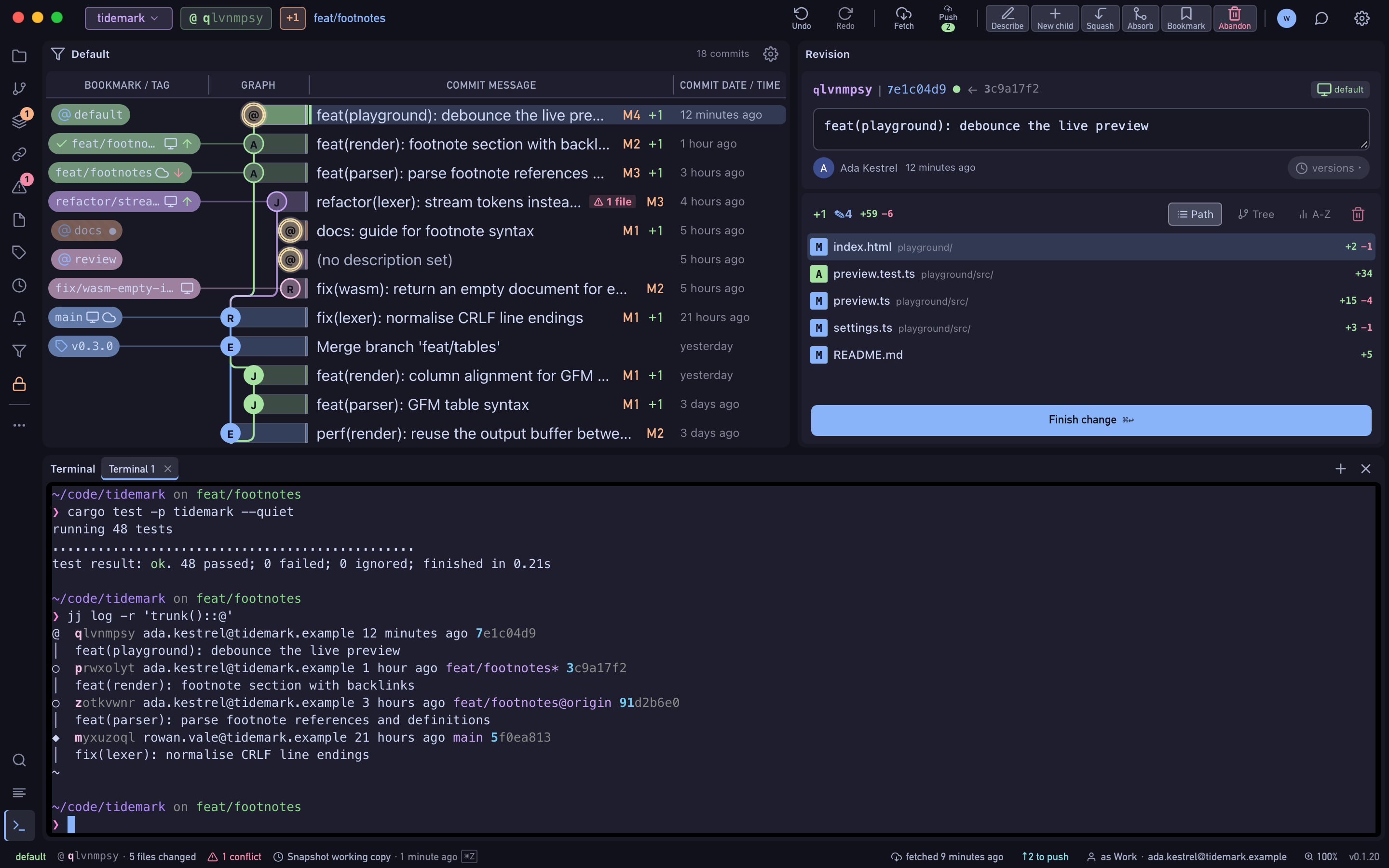
A terminal docked at the bottom of the window runs your own login shell, so Homebrew tools, aliases and your PATH work as they do in Terminal. Everything Wyrm can do is also one search away in the command palette.
- Free Public and local repositories, every feature.
- Pro Private repositories on GitHub, GitLab and Bitbucket, with a 14-day trial.
xkmprotv · commit
How it works
Press ⌃`
The terminal opens in the repository root. Hide it and your sessions keep running.
Work in tabs
Each tab is its own shell. Ctrl+Tab moves between them, and Find searches the scrollback.
Or press ⌘K
The command palette finds push, fetch, split, revert and the rest of the revision menu by name.
mprotvxk · branch
What's included
- Your login shell by default; any shell, arguments and environment in Settings
- Font, cursor, scrollback and colour scheme, applied as you change them
- A link whose text differs from its target asks before it opens
- Screen-reader mode for VoiceOver
- The command palette (⌘K) for every action
rotvxkmp · HEAD
Availability
- Free
- Public and local repositories, every feature.
- Pro
- Private repositories on GitHub, GitLab and Bitbucket, with a 14-day trial.